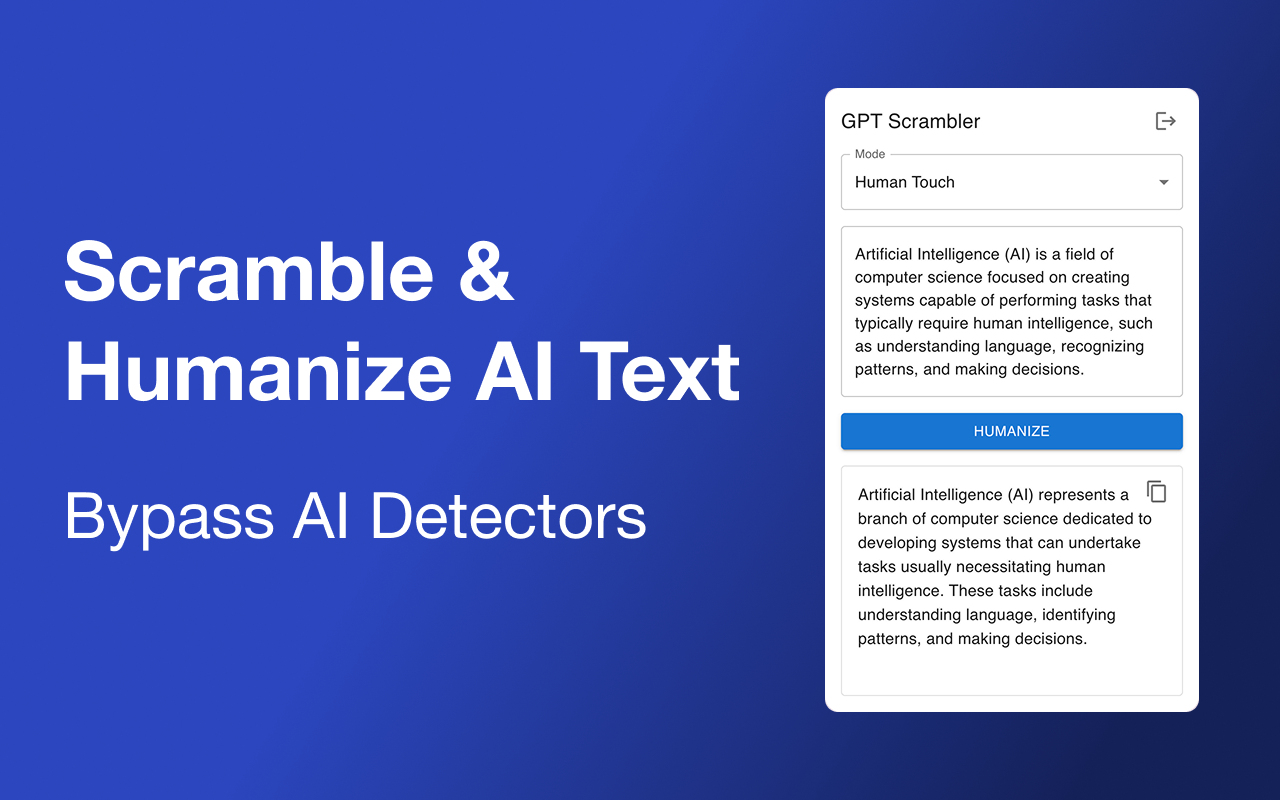
GPT Scrambler
Chrome side-panel rewrite
GPT Scrambler's edge isn't the rewrite — it's where the rewrite happens. Its Chrome extension drops a side panel right inside ChatGPT, Claude, Gemini, Notion or Google Docs, so you highlight AI text, scramble it and drop the human version back in place without ever leaving the page. The free tier asks for nothing — 500 words, no account, no card — and the vendor is refreshingly straight about results, saying it "gets you mostly there" rather than promising a fake 99%. It's the lowest-friction way into the category, built for someone who drafts in ChatGPT all day.
The side panel is the product
Most humanizers make you copy text out, paste it into their site, and copy the result back. GPT Scrambler removes that round trip entirely: the extension works in place, wherever you write. It keeps the original meaning and tone rather than producing a different piece, and it includes one nicely specific touch — it strips the em dashes that are a known ChatGPT tell, swapping in alternatives detectors don't flag as readily. It humanizes across multiple languages too, so a draft written in your first language isn't stuck in English.
What you get
In-place Chrome extension
A side panel inside ChatGPT, Claude, Gemini, Notion or Google Docs — scramble and replace without leaving the page
No-friction free tier
500 words a month, no account, no card
Meaning & tone kept
Rewrites the same content rather than producing a new piece
Em-dash removal
Strips the em dashes that flag AI, with substitutes that don't
Multi-language
Humanizes regardless of the input language
Paid packs
Word-count packs scaling from 2,000 a month to unlimited
How it holds up
Two things stand out about the evidence, and the first is the lack of it: there's no independent test, no review-site presence and no community signal on GPT Scrambler anywhere, and the model behind it isn't named. The second is the vendor's own framing, which is the opposite of the category norm. Instead of a 99% guarantee, GPT Scrambler claims a roughly 80% success rate and tells you outright it "gets you mostly there." That candor is a point in its favor — it's pricing expectations honestly — but it's still a self-reported number with nothing external behind it. The honest read matches the honest claim: it'll likely improve your detector scores rather than guarantee a pass, and the only way to know your number is to run your own text through it and check.
A small free tier, and prices you have to look up
Two practical limits. The free 500 words is a test, not a workflow — real use means a paid pack, and the catch there is that the specific rates aren't posted in a stable way, so you'll need to check the live pricing page for current numbers before committing. And like the rest of the category here, the performance is unverified — fine for everyday content where "mostly there" is enough, riskier for anything that has to clear a strict detector cleanly.
The verdict
GPT Scrambler is the right pick for the ChatGPT-heavy writer who wants humanizing built into the page they already work on — the in-place side panel is a genuine workflow win over copy-paste tools — and for anyone who appreciates a vendor that tells the truth about its ~80% ceiling instead of overselling. The em-dash removal is a thoughtful touch for catching ChatGPT's tells. It's the wrong pick if you need a free tier big enough for real volume, or guaranteed bypass on a strict detector. The side panel is the reason to keep it installed; the honest "mostly there" is the reason to believe what it tells you.
Writing
Undetectable
Humanization
Academic